Zip Tax Receipts & Invoices Privately Offline
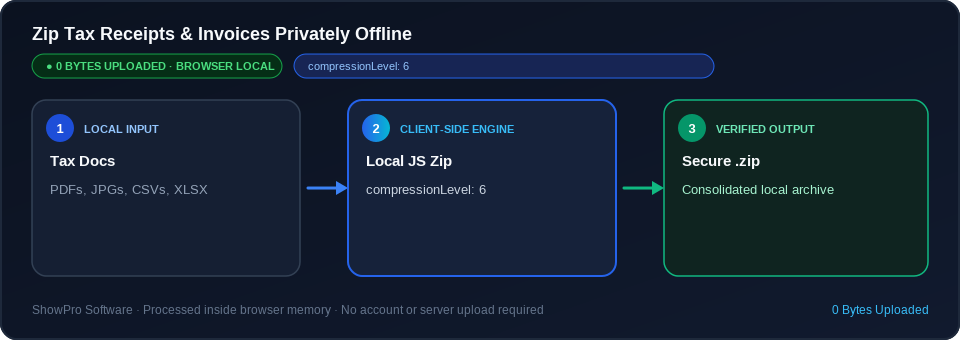
Consolidate your sensitive tax receipts, invoices, and financial spreadsheets into a single, securely compressed ZIP archive directly in your browser. This tool ensures zero-byte upload, keeping your confidential documents entirely on your machine. Pre-configured with an efficient compression level of 6, it balances file size reduction with optimal processing speed for your critical records.
Workflow Checklist
- Verify all 1099-MISC forms and corresponding receipts (e.g., 12 PDFs, 5 JPGs) are included.
- Confirm the final `.zip` file size is under the recipient's attachment limit (e.g., <20MB for most government portals).
- Ensure any sensitive Personal Identifiable Information (PII) like SSN is appropriately redacted in source PDFs/images.
- Check that all dated invoice files (e.g., 'Invoice_2023-01.pdf') are chronologically ordered if required by the recipient.
Parent Tool & Hub
Step-by-Step Guide: Zip Tax Receipts & Invoices Privately Offline
Follow these exact steps to complete this workflow locally in your browser without uploading files.
- 1
Gather Confidential Documents
Collect all necessary tax receipts (PDFs, JPGs), invoices (XLSX, CSV), and contracts from your desktop, 'Downloads' folder, or cloud sync folders like iCloud Drive/OneDrive. Ensure all files are finalized and correctly named.
Tip: Organize files into a temporary folder (e.g., '2023_Tax_Docs') on your desktop for easy selection. - 2
Add Files to ShowPro Tool
Drag and drop your selected financial documents directly into the designated area on this ShowPro page. Alternatively, use the 'Browse Files' button to select multiple files from your Windows Explorer or Mac Finder.
Tip: Confirm no sensitive files are accidentally left out; verify the count displayed after adding. - 3
Initiate Local Archiving
Click the 'Zip Files' button. The tool will process your documents locally within your browser using a compression level of 6. This ensures efficient, private bundling without any server interaction.
Tip: For very large sets (hundreds of files), processing time depends on your browser's memory and CPU. - 4
Download & Verify Archive
Once complete, your browser will automatically prompt you to download the `.zip` file. Save it to a secure location. Open the `.zip` in Windows Explorer or Mac Finder to verify all original documents are present and intact.
Tip: Rename the downloaded zip immediately (e.g., 'Tax_Receipts_2023_Final.zip') for clear identification.
Technical Specifications & Preset Reference
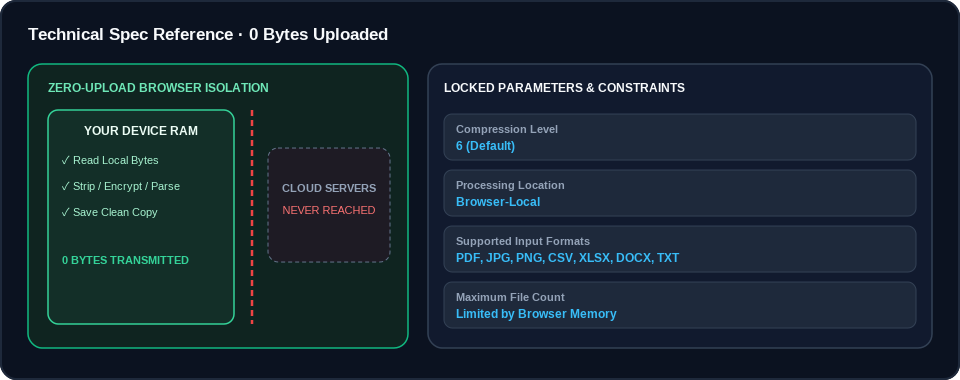
| Parameter | Recommended Setting | Why It Matters |
|---|---|---|
| Compression Level | 6 (Default) | This preset balances optimal file size reduction with processing speed, ideal for document archives where integrity is key. |
| Processing Location | Browser-Local | Ensures zero-byte upload, meaning your confidential tax receipts and invoices never leave your device for maximum privacy. |
| Supported Input Formats | PDF, JPG, PNG, CSV, XLSX, DOCX, TXT | Accommodates the diverse range of digital receipt and invoice formats commonly encountered from various financial sources. |
| Maximum File Count | Limited by Browser Memory | While robust, extremely large batches (e.g., 500+ files) might exceed browser memory; process in smaller, manageable groups. |
Common Issues & Troubleshooting Fixes
Zip file exceeds email attachment limits or portal caps (e.g., USCIS 25MB)
If the final `.zip` is too large, use ShowPro's dedicated Zip Splitter tool to divide it into smaller, compliant segments after downloading.
Corrupted or unreadable source documents within the zip
Before zipping, ensure all PDFs open correctly in Mac Preview/Adobe Reader, and CSV/XLSX files load without errors in Excel.
Excel CSV files not importing correctly into financial software post-zip
Ensure original CSVs are saved with UTF-8 encoding and a Byte Order Mark (BOM) from Excel before zipping, as some systems require it.
Why Run This Workflow Locally in ShowPro?
Unlike remote online zip services that require uploading your confidential tax receipts and invoices to their servers, ShowPro processes everything locally in your browser. This crucial privacy-by-design approach ensures your sensitive financial data, business spreadsheets, and personal contracts never leave your machine, eliminating data breach risks inherent with cloud-based processing.
Frequently Asked Questions
Is my financial data truly private when using this tool?
Absolutely. All processing for zipping your tax receipts and invoices occurs locally in your web browser. 0 bytes are ever uploaded to any server, guaranteeing maximum confidentiality.
Can I change the compression level for my tax receipt archive?
This specific page is pre-configured for optimal document compression (level 6). For custom compression levels, please navigate to the main ShowPro ZipCreator tool (/tools/zip-creator) where you can adjust this setting.
What if I have hundreds of tax receipts and invoices to zip?
While the tool is robust, zipping extremely large quantities (e.g., 500+ files or very large individual files) might be limited by your browser's available memory. Consider processing them in smaller batches.
Can I password-protect the zip file directly with this tool?
This tool focuses on local compression. Password protection for the `.zip` file is typically an operating system feature. After downloading, use Windows Explorer (right-click -> Send to -> Compressed (zipped) folder -> encrypt) or a third-party utility on Mac.