Count Exact Characters With & Without Spaces
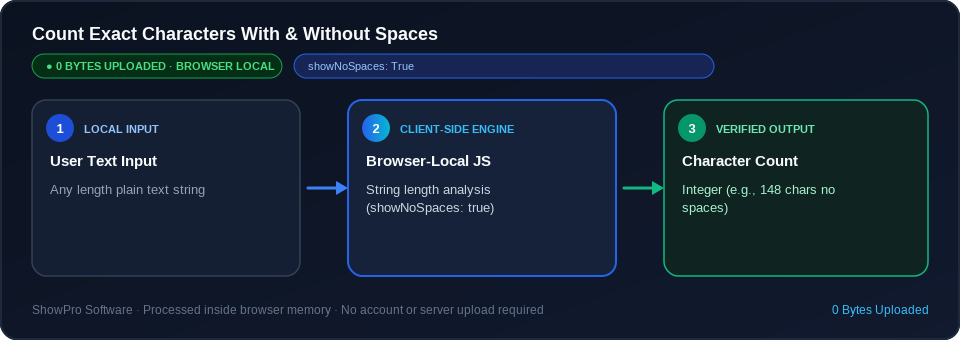
This utility solves the critical need for precise character counting without spaces, locally in your browser. Ideal for strict platform limits like social media bios or meta descriptions, it ensures privacy by processing all text on your device. The tool is pre-configured with `showNoSpaces` enabled, providing an instant character count excluding whitespace.
Workflow Checklist
- Twitter Bio: <= 160 characters (no spaces)
- Instagram Bio: <= 150 characters (no spaces)
- Discord Status: <= 128 characters (no spaces)
- GitHub Repo Description: <= 100 characters (no spaces)
Parent Tool & Hub
Step-by-Step Guide: Count Exact Characters With & Without Spaces
Follow these exact steps to complete this workflow locally in your browser without uploading files.
- 1
Paste or Type Your Text
Open the ShowPro Character Counter page. Locate the large text area labeled "Paste or type your text here." Copy your content from its source (e.g., Discord bio, GitHub readme) and paste it into this input field.
Tip: Use `Ctrl+V` (Windows/Linux) or `Cmd+V` (macOS) for quick pasting. - 2
Verify 'No Spaces' Setting
Confirm the "Count without spaces" option is already active. This preset ensures all whitespace characters (spaces, tabs, newlines) are excluded from the primary character count.
Tip: The `showNoSpaces` preset is active by default for this specific tool URL. - 3
Review Character Counts
Immediately below the input area, observe the real-time character counts. The prominent display will show "Characters (no spaces)" with the exact number for your input.
Tip: Numbers update instantly as you type or modify text in the input box. - 4
Adjust Content as Needed
Compare the "Characters (no spaces)" count against your target platform's limits (e.g., Twitter bio 160 chars, Instagram bio 150 chars). Edit your text directly in the input field to meet the constraint.
Tip: Focus on concise wording to maximize impact within tight character budgets. - 5
Copy Finalized Text
Once your text meets the character limit, select all the content in the input field and copy it. You can then paste this optimized text into its final destination, like a Shopify product meta description or a USCIS form field.
Tip: The `Ctrl+A` then `Ctrl+C` shortcut is fastest for copying all content.
Technical Specifications & Preset Reference
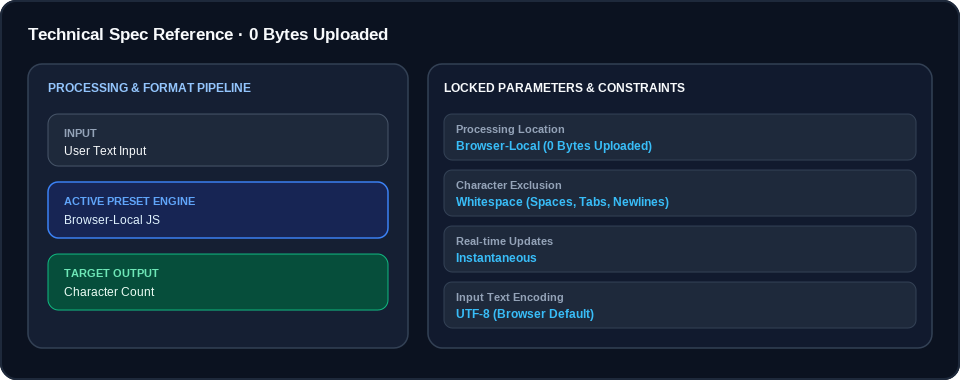
| Parameter | Recommended Setting | Why It Matters |
|---|---|---|
| Processing Location | Browser-Local (0 Bytes Uploaded) | Ensures sensitive text, like proprietary config snippets or private messages, never leaves your device's browser. |
| Character Exclusion | Whitespace (Spaces, Tabs, Newlines) | Crucial for platforms like Discord or GitHub that enforce strict character limits often excluding non-content whitespace. |
| Real-time Updates | Instantaneous | Provides immediate feedback as you type, allowing for rapid iteration and adherence to tight character budgets. |
| Input Text Encoding | UTF-8 (Browser Default) | Handles a full range of Unicode characters, essential for global content or special symbols in bios without errors. |
| Account Requirement | None | Streamlines workflow by removing login barriers, enabling quick access for one-off checks without personal data collection. |
Common Issues & Troubleshooting Fixes
Social media bio rejection due to 'hidden' spaces.
Use this tool with `showNoSpaces` to get the exact count platforms use, then trim word endings to fit.
DS-160 form field exceeding character limits, including invisible newlines.
Paste your text into ShowPro, ensure `showNoSpaces` is active, and manually remove extra newlines or paragraphs to fit.
GitHub commit message or PR title exceeding visible character limits.
The 'no spaces' count helps identify if actual content characters are the issue, prompting you to rephrase concisely.
Shopify meta description truncation in search results.
Optimize your meta description here to fit within 160 characters (no spaces) to prevent Google from truncating crucial keywords.
Why Run This Workflow Locally in ShowPro?
Unlike remote character counters, ShowPro processes your text entirely within your browser for `character counter without spaces locally`. This means sensitive data, like API keys or proprietary code snippets, never touches a third-party server. For strict character limits on platforms like USCIS forms or internal logs, this local processing ensures absolute privacy and instant results without upload delays.
Frequently Asked Questions
Why does my character count differ from another tool?
Other tools might include or exclude different whitespace characters (spaces, tabs, newlines). This ShowPro tool is pre-configured to strictly exclude all whitespace, providing a 'no spaces' count critical for many platform limits.
Is my text truly private when using this tool?
Absolutely. All text processing for `Count Exact Characters With & Without Spaces` occurs entirely within your web browser. No data is uploaded to ShowPro servers, ensuring 0 bytes are transmitted and your privacy is maintained.
Can I count characters with spaces if I need to?
Yes, while this specific page defaults to `showNoSpaces`, you can navigate to the main `/tools/word-counter` page to access options for counting characters both with and without spaces, or other variations.
Does it count special characters and emojis?
Yes, the tool correctly counts all Unicode characters, including emojis, diacritics, and special symbols, as single characters when providing the 'no spaces' count, adhering to UTF-8 standards.
What if my text has hidden formatting characters?
The tool counts visible characters and common whitespace. If you paste from a rich text editor, some invisible formatting might be stripped, ensuring a clean character count relevant for plain-text inputs like social media bios.