Diff Two Config or .env Files Locally (Zero Upload)
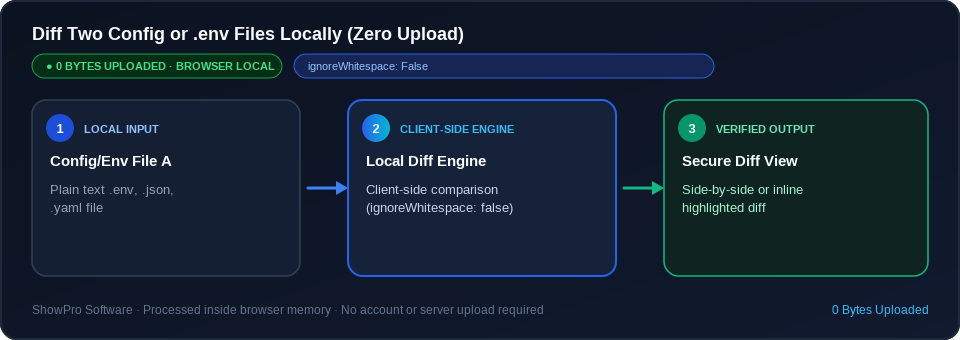
Quickly and privately compare two configuration (.ini, .json, .yaml) or .env files directly in your browser. This tool ensures sensitive credentials or settings never leave your machine, providing a secure diff without any server uploads. The 'ignoreWhitespace' option is pre-configured to 'false' for precise character-by-character comparison.
Workflow Checklist
- Verify `NODE_ENV` is 'production' in the deployed config and 'development' in the local version.
- Confirm all `API_KEY` or `DB_PASSWORD` variables are redacted or correctly set for the target environment.
- Check for unexpected changes in `PORT` numbers or `CORS_ORIGIN` settings between versions.
- Ensure critical `feature_flag` values (e.g., `true`/`false`) align with expected deployment behavior.
Parent Tool & Hub
Step-by-Step Guide: Diff Two Config or .env Files Locally (Zero Upload)
Follow these exact steps to complete this workflow locally in your browser without uploading files.
- 1
Open Your First Config File
Click 'Choose File A' and navigate to your first configuration file (e.g., `production.env` or `config.json`) using your OS file explorer. Select and open it.
Tip: Ensure the correct file encoding (UTF-8 is common) to prevent character display issues. - 2
Open Your Second Config File
Click 'Choose File B' and select the second configuration file (e.g., `staging.env` or `config.yaml`) you wish to compare against the first. Both files load locally.
Tip: For macOS, use Finder's Quick Look (Spacebar) to confirm file contents before selection. - 3
Review the Local Diff Output
Once both files are loaded, the tool automatically displays a side-by-side or inline diff. Added lines are highlighted green, removed lines red.
Tip: Scroll through the diff to identify specific changes in variables, paths, or API keys. - 4
Analyze Key Configuration Changes
Focus on changes in critical sections like database connection strings, API endpoints, or environment variables. These often indicate deployment differences or potential issues.
Tip: Pay close attention to changes in `PORT`, `DB_HOST`, `API_KEY`, or `NODE_ENV` variables. - 5
Export Diff for Record (Optional)
If needed, use your browser's print-to-PDF function to save the diff view as an offline record. This creates a local PDF without server interaction.
Tip: Use 'Print to PDF' and select 'Layout: Landscape' for wider diff visibility.
Technical Specifications & Preset Reference
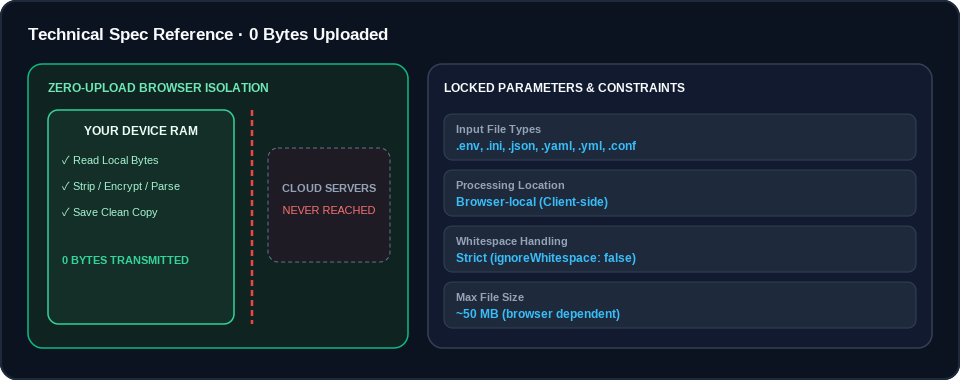
| Parameter | Recommended Setting | Why It Matters |
|---|---|---|
| Input File Types | .env, .ini, .json, .yaml, .yml, .conf | Supports common configuration formats ensuring broad utility for developers and system administrators. |
| Processing Location | Browser-local (Client-side) | Guarantees zero upload of sensitive configuration files, maintaining strict privacy and security for credentials. |
| Whitespace Handling | Strict (ignoreWhitespace: false) | Ensures even subtle whitespace changes (e.g., indentation) are highlighted, crucial for YAML or Python configs. |
| Max File Size | ~50 MB (browser dependent) | Accommodates typical configuration files; larger files might impact browser performance but remain local. |
| Account Requirement | None | Enables instant, anonymous use for quick comparisons without needing sign-ups or personal data. |
Common Issues & Troubleshooting Fixes
Crucial whitespace changes in YAML or Python config files are not showing in the diff.
This tool's preset 'ignoreWhitespace: false' ensures all whitespace differences are highlighted. If not, check your browser zoom or scroll horizontally.
File A and File B appear identical, but the application behaves differently.
Verify you selected the correct versions of the files. Sometimes local development environments use different files than deployed ones, or there's an active overlay.
The diff output shows unreadable characters or mojibake for certain lines.
The file might be saved with an unusual encoding. Try converting the source files to UTF-8 using a text editor like VS Code or Notepad++ before loading.
Comparing large configuration files causes the browser to slow down or become unresponsive.
While the tool handles typical sizes, extremely large files (many MBs) can strain browser memory. Try splitting very large configs into smaller modules if possible.
Why Run This Workflow Locally in ShowPro?
Comparing configuration or .env files locally in your browser offers unparalleled security. Unlike remote diff services that require uploading sensitive files, this tool processes everything client-side. Your database credentials, API keys, and environment variables never leave your machine, eliminating the risk of data breaches or exposure that comes with transmitting confidential data over the internet.
Frequently Asked Questions
Can I compare files with different extensions, like a .env with a .json?
Yes, you can compare any two text-based files regardless of their extension. The tool focuses on the textual content, not the file type, to generate the diff output.
What if my config file contains binary data or non-text content?
This tool is designed for text-based configuration files. While it will attempt to display binary content, the diff will likely be unreadable. Ensure your files are plain text.
Does 'ignoreWhitespace: false' mean it will highlight every space difference?
Precisely. With 'ignoreWhitespace' set to 'false', the tool performs a strict character-by-character comparison, highlighting even a single space or tab difference. This is crucial for syntax-sensitive formats like YAML.
Is there a way to merge the changes directly within the tool?
No, this tool provides a visual comparison only. It identifies differences but does not offer an in-browser merge function. You'll need to manually apply changes using a text editor.
How does this tool handle line endings (CRLF vs. LF) across different OS?
The diff algorithm normalizes line endings internally before comparison, so differences in `CRLF` vs `LF` will generally not appear as changes unless one file consistently uses a different standard.