Get File MD5 Checksum Instantly Without Uploading
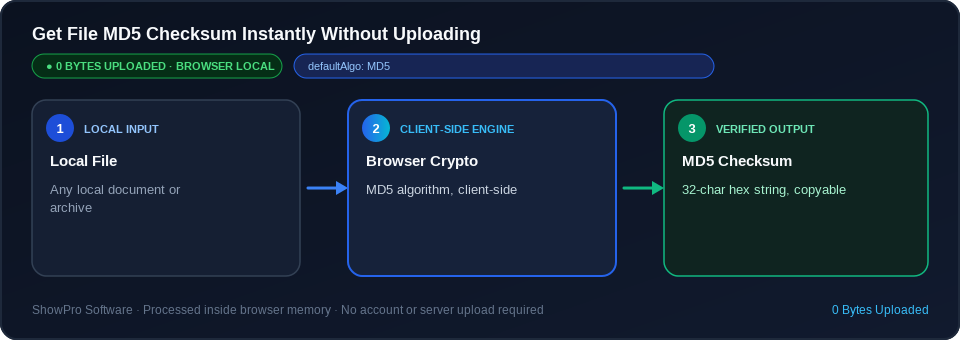
Quickly verify file integrity without compromising privacy. This tool computes MD5 checksums entirely within your browser, ensuring sensitive documents like business spreadsheets or contracts never leave your machine. The default algorithm is pre-configured to MD5 for immediate use.
Workflow Checklist
- Verify integrity of a critical Excel business spreadsheet before emailing to ensure no corruption occurred during transfer.
- Confirm a downloaded software installer's MD5 matches the publisher's provided hash (e.g., for a Linux .iso) to detect tampering.
- Generate MD5 for a contract PDF before submitting to a legal portal that requires hash validation.
- Check MD5 of a large archive (.zip, .tar.gz) after transfer to ensure all contents are intact and uncorrupted.
Parent Tool & Hub
Step-by-Step Guide: Get File MD5 Checksum Instantly Without Uploading
Follow these exact steps to complete this workflow locally in your browser without uploading files.
- 1
Select Your Local File
Click the 'Choose File' button. Navigate your local file system (e.g., Windows Explorer, macOS Finder) to select the specific document, archive, or executable you wish to checksum.
Tip: For large files, ensure your browser is the active window to prevent background processing pauses. - 2
Initiate MD5 Calculation
Once selected, the browser automatically begins calculating the MD5 checksum. No 'upload' button is needed; processing starts immediately on your local machine.
Tip: The calculation time depends on file size and your device's processing power. - 3
Copy the MD5 Checksum
After computation, the 32-character hexadecimal MD5 hash will appear. Click the 'Copy' icon next to the result to save it to your clipboard for verification.
Tip: Verify the copied hash against a known good hash from the file's source. - 4
Compare Against Source
Paste the copied MD5 hash into your destination system (e.g., Discord file upload dialog, GitHub release notes, USCIS document portal) to ensure file integrity.
Tip: Many portals, like Shopify, require exact hash matches for asset validation. - 5
Process Another File
To checksum another file, simply repeat Step 1. The tool resets automatically, ready for your next local file selection without refreshing the page.
Tip: This tool is optimized for single file checks, not batch processing.
Technical Specifications & Preset Reference
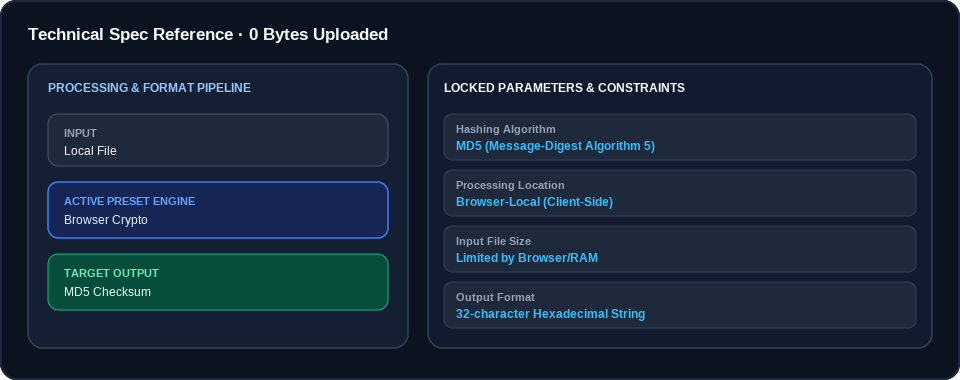
| Parameter | Recommended Setting | Why It Matters |
|---|---|---|
| Hashing Algorithm | MD5 (Message-Digest Algorithm 5) | MD5 is pre-selected for broad compatibility and quick integrity checks, commonly used across various platforms and services. |
| Processing Location | Browser-Local (Client-Side) | Ensures 0 bytes of your file are ever uploaded, safeguarding sensitive data like contracts or financial reports. |
| Input File Size | Limited by Browser/RAM | While theoretical limits are high, extremely large files (GBs) may strain browser memory, potentially slowing calculation. |
| Output Format | 32-character Hexadecimal String | Standard MD5 output, universally recognized for comparison against other computed or provided hashes. |
| Account Requirement | None | Immediate access without sign-ups or logins, ideal for quick, anonymous, and secure file verification needs. |
Common Issues & Troubleshooting Fixes
MD5 mismatch when verifying a downloaded file.
Ensure the downloaded file completed successfully and isn't partially corrupted. Re-download if necessary, then re-calculate the MD5. Also, confirm the source-provided MD5 is correct.
Browser tab becomes unresponsive during calculation.
For very large files (e.g., multi-GB ISOs), the browser might appear frozen. Allow sufficient time; the calculation is CPU-intensive. Close other demanding tabs or applications to free up resources.
Confusion with other hash algorithms (SHA1, SHA256).
This tool is preset to MD5. If a different algorithm is required (e.g., for specific portal requirements like DS-160 document uploads), navigate to the main File Hash Calculator tool to select the correct hash type.
Attempting to checksum a cloud-synced file without local access.
Always ensure the file is fully downloaded and present on your local drive before attempting to calculate its MD5. Browser tools cannot access files only available in cloud storage (e.g., iCloud.com, Google Drive web interface).
Why Run This Workflow Locally in ShowPro?
Unlike server-based MD5 calculators that require uploading your entire file, this tool performs all computations locally within your browser. For sensitive files like business contracts, personal archives, or confidential spreadsheets, this client-side approach guarantees zero data ever leaves your machine, eliminating privacy concerns and potential data breaches associated with remote processing.
Frequently Asked Questions
Is my file actually uploaded to a server for MD5 calculation?
No. This tool processes your file entirely within your browser environment. Your data remains on your local machine, ensuring absolute privacy and security for sensitive documents.
Why is MD5 the default algorithm for this tool?
MD5 is widely supported and commonly used for basic file integrity checks across various platforms and legacy systems. It offers a good balance of speed and reliability for general verification purposes.
Can I use this tool to calculate SHA1 or SHA256 hashes?
This specific page is pre-configured for MD5 only. For SHA1, SHA256, or other hash algorithms, please visit our main 'File Hash Calculator' tool page where you can select your desired algorithm.
What happens if my browser crashes during a large file calculation?
If your browser crashes, the calculation will stop. You will need to restart the process by re-selecting the file. No data is lost, as the file never left your machine, but the hash won't be completed.
Is there a file size limit for MD5 calculation?
While there's no hard coded limit, extremely large files (e.g., tens of gigabytes) may exhaust your browser's memory or take a very long time to process, potentially impacting responsiveness.